Phishing Report: Thank you for shopping with us!
by Jon Lober | NOC Technology | April 29, 2024
Thanks for nothing: taking a closer look at fake iPhone order confirmation emails.
Our IT experts weigh in on a recent iPhone phishing attempt that made it past Gmail's filters.
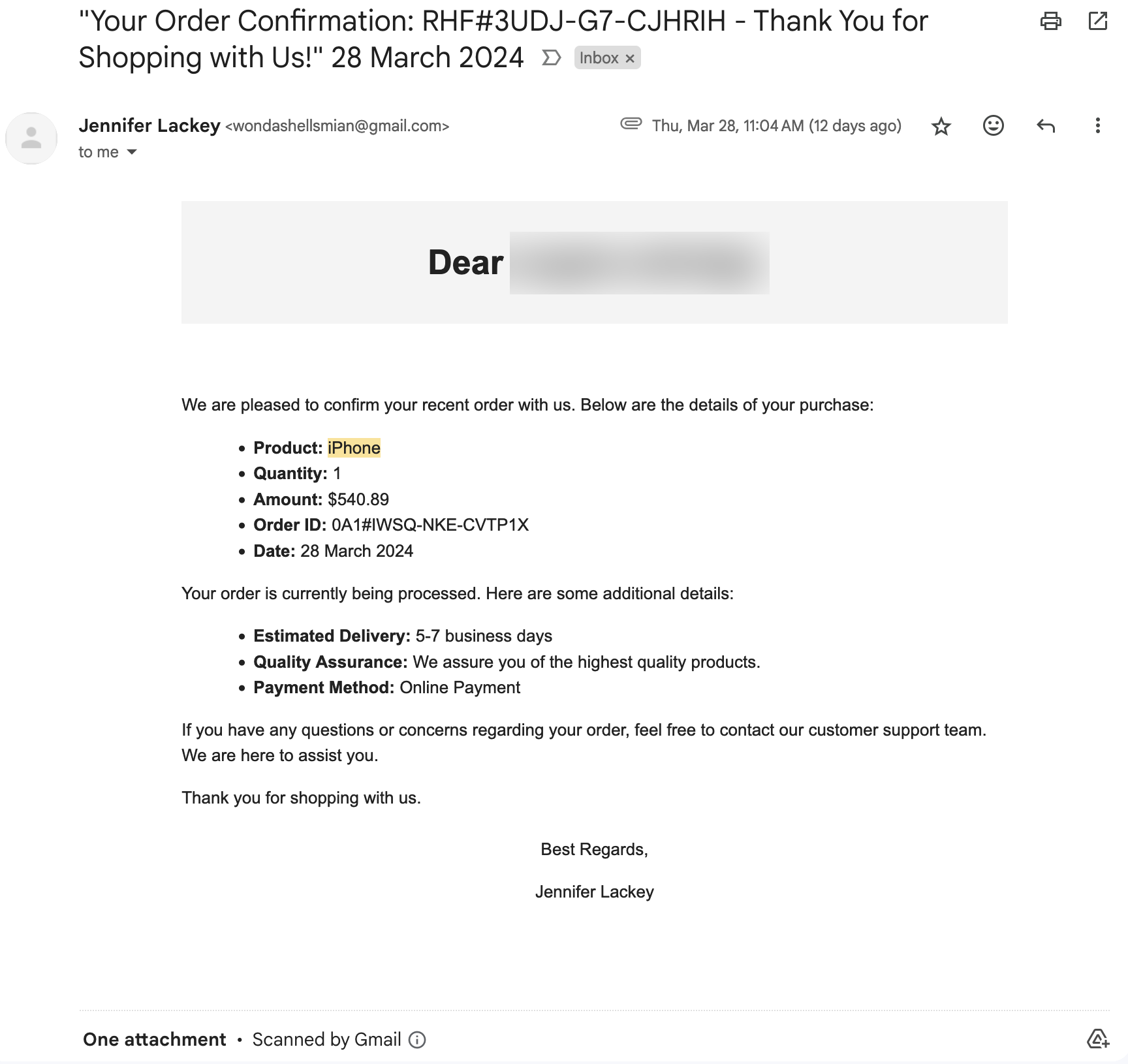
Have you seen this email (or a version of it)?
As a local IT consulting and cybersecurity firm, it's crucial for us to stay vigilant against online threats, including phishing scams. Recently, our team received a particularly insidious phishing email disguised as an order confirmation for an iPhone purchased through an online marketplace. The email, purportedly from a seller named Jennifer Lackey, included a fake PayPal receipt and appeared to be a legitimate transaction confirmation. In fact, this email looked so good that the individual's spouse called to ask if they'd ordered an iPhone.
However, upon closer inspection, several red flags immediately stood out.
Here's a breakdown of the suspicious elements in the email:
- Oddly Capitalized Greeting: While we've redacted the name here, the email begins with a generic greeting: Dear individual's name, formatted strangely and with improper capitalization. If the email recipient had made an online purchase, they would likely use correct capitalization of their own name.
- Urgency Tactics: Phishing emails often try to create a sense of urgency to prompt immediate action. In this case, the email mentions an estimated delivery timeframe of 5-7 business days, subtly pressuring the recipient to act quickly without carefully verifying the authenticity of the message.
- Lack of Specifics: While the email provides some details about the supposed purchase, such as the product (iPhone), quantity, amount, and order ID, it lacks specific information that would typically be included in a legitimate order confirmation, such as the specific model of iPhone purchased (Apple has released at least 42 models since 2007) shipping address, or tracking information.
- Suspicious Payment Method: The email claims that the payment method used for the purchase was "Online Payment," which is vague and doesn't specify a reputable payment service provider. Legitimate businesses typically provide clear information about the payment method used for transactions. The attached "invoice" shows a prominent Paypal logo, but that information is missing from the order confirmation itself.
- No Contact Information: Although the email encourages the recipient to reach out with any questions or concerns, it fails to provide any contact information for the supposed customer support team. Legitimate businesses typically include contact details or links to customer support channels for inquiries.
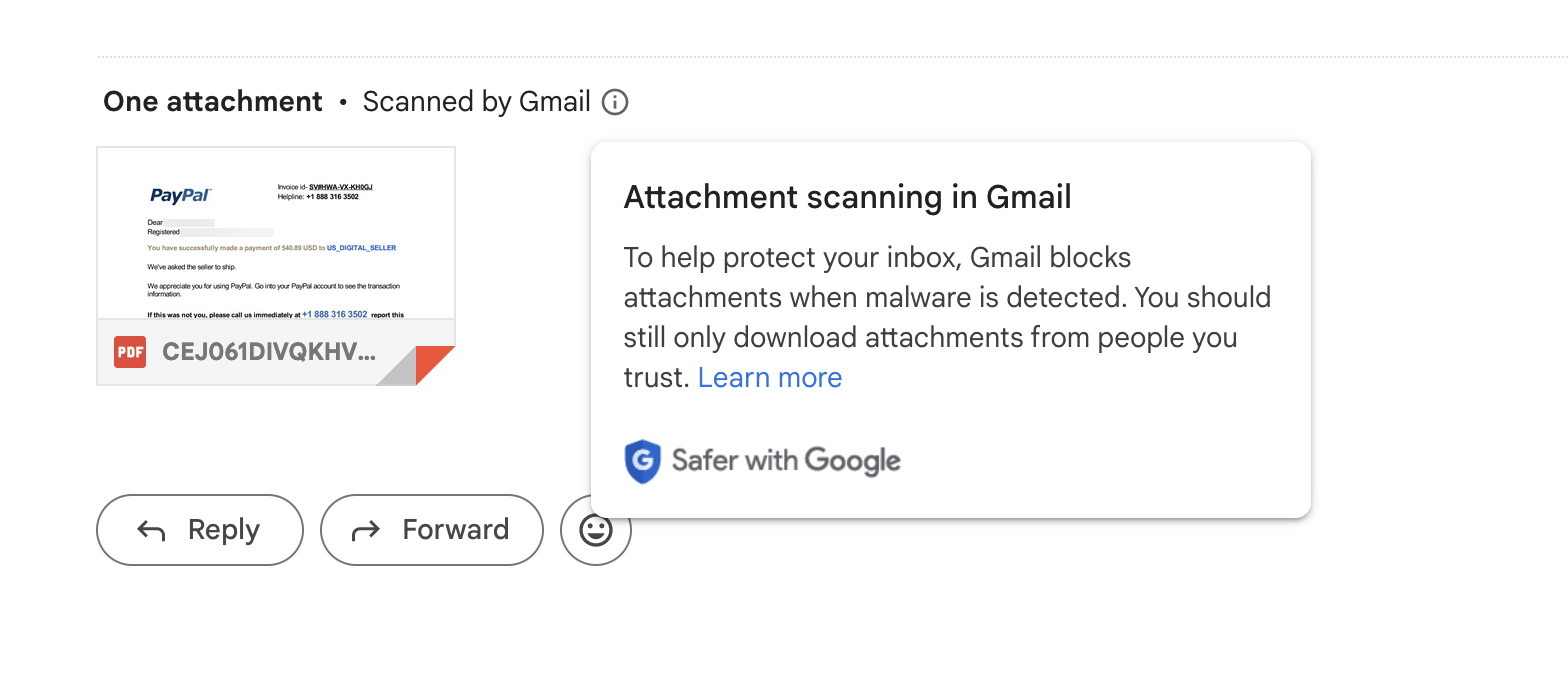
What to do with a fake iPhone order email.
Given these glaring inconsistencies and red flags, it's evident that this email is a phishing attempt designed to deceive recipients into divulging sensitive information or clicking on malicious links. To protect yourself and others from falling victim to similar scams, here are some steps you can take:
- Verify the Sender: Always double-check the sender's email address and look for any signs of impersonation or spoofing. Legitimate businesses usually use domain-specific email addresses, whereas phishing emails may come from suspicious or unfamiliar domains.
- Inspect URLs and Attachments: Be cautious of clicking on any links or downloading attachments from unsolicited emails. Hover over hyperlinks to preview the destination URL and ensure they lead to legitimate websites. Similarly, exercise caution when opening email attachments, especially if they're unexpected or from unknown sources.
- Report Phishing Attempts: If you receive a suspicious email like the one described above, report it to the appropriate authorities immediately. You can forward phishing emails to organizations like the Anti-Phishing Working Group or the Federal Trade Commission to help combat fraudulent activity and protect others from falling victim to similar scams. For more information on how to report phishing emails, check out our blog post.
By staying informed and vigilant, we can work together to thwart phishing attempts and safeguard our personal and financial information from cybercriminals. Remember, when in doubt, always err on the side of caution and verify the legitimacy of any unexpected or suspicious emails before taking any action.
Stay safe online! If you have any questions about suspicious activity in your inbox, don't hesitate to reach out.
Jon Lober is the CEO of NOC Technology, a managed service provider and business technology consultant based in Washington, Missouri and servicing greater St. Louis and beyond. With over 25 years of business management experience and more than 15 in IT, Jon understands both the complexities of both business operations and the technological infrastructure that makes work possible. Jon is a CMMC Registered Practitioner from CyberAB and is passionate about cybersecurity compliance, business continuity, and intelligent automation, all built to support and protect US-based businesses.